| 2025-06-13 | Maven 3.9.10 |
| 2025-04-28 | TeX-UPmethodology 20250428 |
| 2025-04-26 | TeX-UPmethodology 20250426 |
| 2024-09-24 | Maven 3.9.9 |
| 2024-08-13 | Noble Numbat |
| 2024-06-21 | Maven 3.9.8 |
AutoLaTeX is a tool for managing small to large sized LaTeX documents. The user can easily perform all required steps to do such tasks as: preview the document, or produce a PDF file. AutoLaTeX will keep track of files that have changed and how to run the various programs that are needed to produce the output. One of the best feature of AutoLaTeX is to provide translator rules (aka. translators) to automatically generate the figures which will be included into the PDF.
As a quick example, consider a project which has a single LaTeX file, code>mydoc.tex, as its input. To produce a PDF file you might use the following sequence of commands:
$> pdflatex mydoc.tex
$> bibtex mydoc.tex
$> pdflatex mydoc.tex
$> pdflatex mydoc.tex
$> pdflatex mydoc.tex
The triple invocation of LaTeX is to ensure that all references have been properly resolved and any page layout changes due to inserting the references have been accounted for. The sequence of commands isn't horrible, but it still is several commands. To use AutoLaTeX for this project, you would use one of the following the command lines:
$> autolatex -f mydoc.tex
For documents, which may need to run programs to create the PDF versions of the drawings, which are included into the PDF document, or run BibTeX to generate bibliographies, the generation of the .pdf (or other) files becomes increasingly complicated to run manually. With AutoLaTeX, such operations are still very simple: you have nothing to do. AutoLaTeX is calling the translators for you. Each translator is able to convert an picture source file (eps, svg, Gnuplot...) into a PDF or PNG file.
The process of AutoLaTeX is illustrated by the following Figure:
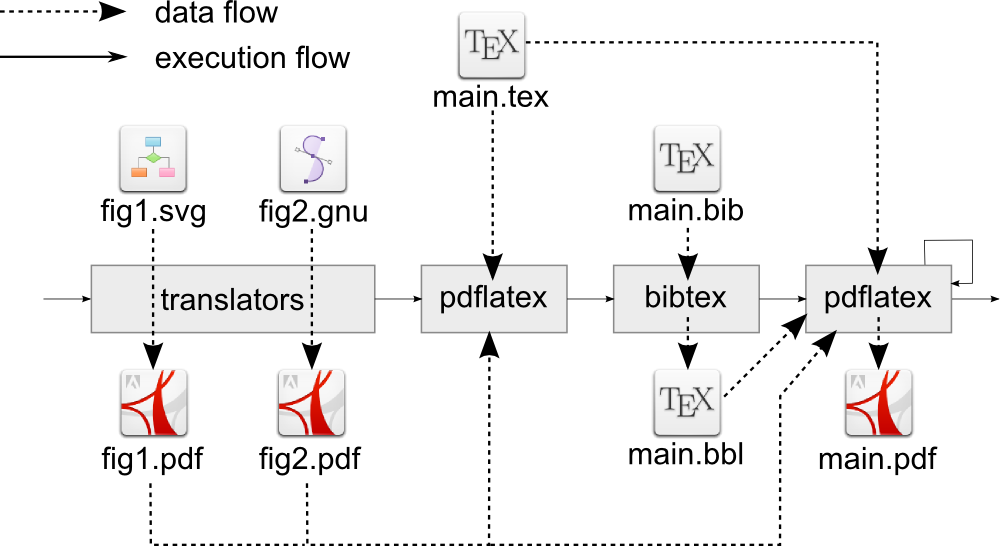
Hopefully this introduction has provided an adequate example for how AutoLaTeX can simplify the management of LaTeX-based documents. The AutoLaTeX system is simple enough for small projects and powerful enough for large projects. The remainder of this manual will provide complete documentation on the use of AutoLaTeX as well as configuration and installation instructions.
AutoLaTeX provides several user interfaces (graphical or CLI) that may help you to use it:
autolatex: the standard command line interface for AutoLaTeX.autolatex-config: provides a Gtk3 frontend for configuring AutoLaTeX.gedit-autolatex-plugin: a plugin for the lightweight editor Gedit. This plugin re-uses the windows ofautolatex-config- Sublime Text: integration into the LaTeXTools of the Sublime Text editor.
autolatex-backend: a command line interface for extracting information from the AutoLaTeX's knowledge.
Details
- Main author: GALLAND Stéphane
- Contributors: see list on Github.com
- License: GPL
- Implementation: Perl, LaTeX, Python
- Stable Version: 41.1

AutoLaTeX and other TeX makers
The following table compares several features of TeX makers from CTAN (including AutoLaTeX):
| Maker | Type | Date | Supported Tools | Detect Changes | Automatic File Convertions | Export to Elsevier | Editor Plugins | ||||
|---|---|---|---|---|---|---|---|---|---|---|---|
| TeX | BibTeX | Images | To PS/PDF/PNG | To TeX | To PSTeX/PdfTeX | ||||||
| AutoLaTeX | Perl/Python | 2014 | latex, pdflatex, xelatex, lualatex, bibtex, biber, makeindex, texindy, makeglossaries, dvips | X | X | X | asta, asml, dia, dot, fig, ggb, gxl, odg, plot, svg, vsd, xmi | c/c++, java, matlab, ml, perl, python, ruby, sql, Beamer | fig, plot, dia, svg, Beamer | X | Gedit3, Gtk3, Sublime Text 3 (see LaTeXTools plugin). Deprecated: Gedit2, Sublime Text 2, Gtk2 |
| go-make | Perl | 1993 | latex, dvips, bibtex, makeindex | X | X | X | |||||
| latex-make | Makefile | 2003 | latex, pdflatex, dvips, ps2pdf, bibtex, makeindex | X | X | fig | |||||
| latexmk | Perl | 2012 | latex, dvips, dvipdf, xelatex, pdflatex, bibtex, makeindex | X | X | X | |||||
| latexn | csh | 1997 | dvi | latex, bibtex, makeindex | |||||||
| make-latex | Makefile | 1993 | latex, dvips, bibtex | X | X | X | fig, plot | fig | |||
| mk | Ruby | 2012 | latex, xelatex, pdflatex, texi2dvi | X | X | X | |||||
| rake4latex | Ruby | 2001 | pdflatex, xelatex, lualatex, bibtex, makeindex | X | X | ||||||
| rubber | Python | 2010 | pdflatex, etex, aleph, omega, vtex, bibtex, makeindex | X | X | ? | X | ||||
| ShLaTeX | Bash/C | 2003 | latex, pdflatex, dvips, ps2pdf, bibtex, makeindex | X | X | X | |||||
| texi2dvi | Sh | 2013 | latex, dvips, dvipdf, pdflatex, bibtex, makeindex | X | X | ||||||
The columns are:
- Maker: is the name of the TeX maker;
- Type: is the language of implementation;
- Date: is the date of the last update on CTAN;
- Supported Tools: are the tools that are used/invoked to produce the output;
- Detect Changes: indicates if the TeX maker is able to detect changes in source files, and avoid to re-compile when the files have not changed. Three types of files are considered:
- TeX files (.tex),
- BibTeX files (.bib), and
- source images that are included in the document (png, jpg, pdf, ps, eps...);
- Automatic File Conversions: indicates if the TeX maker is able to produce a picture that could be included in a TeX document (usually: PS, PDF or picture formats) from a source format that could not be directly include in the TeX document. The formats of these source pictures are specified. Three output formats are detailled:
- PS, PDF or png: the tool is able to convert a source file to one of these three formats;
- TeX: the tool is able to create a TeX file from the source file;
- PSTeX/PDFTeX: the tools is able to produce a PS or a PDF file with embedded TeX macros.
- Export to Elsevier: Elsevier is a scientific publisher who permits to upload TeX white-papers for publication. After uploading the source files, the Elsevier website is running TeX on it, and give a compilation feedback. To avoid to much problems during this online compilation, I recommend:
- to use only one TeX file,
- to have all the included figures in the same directory as as the TeX file, and
- to replace the references to BibTeX files by inlined bib items inside the main TeX file.
-
This column indicates if the tools is able to create a version of the document that is fitting these recommendations.
- Editor Plugins: indicates if a plugin dedicated to AutoLateX is provided for a TeX editor. Note that most of the TeX editors do not need specific plugins : TeXworks, Kile... Because they permits to add composition/build tools manually.
AutoLaTeX on Ubuntu Linux
AutoLaTeX is provided in several Ubuntu packages:
autolatex: an empty package that depends on all the other packages;autolatex-core: the AutoLaTeX core implementation;autolatex-gtk: GTK interface to configure AutoLaTeX;autolatex-astah: Astah/Jude (.asta, .jude, .juth) converter based on the Astah editor (Professional, UML, or Community editions)autolatex-asml: Astah SysML (.asml) converter based on the Astah SysML editorautolatex-asymptote: Asymptote (.asy) converter;autolatex-dia: Dia (.dia) converter;autolatex-sty: LaTeX style which is providing usefull macros;autolatex-geogebra: GeoGebra (.ggb) converter;autolatex-gimp: The Gimp (.xcf) converter;autolatex-gnuplot: Gnuplot (.plot) converter;autolatex-grapviz: Graphviz Dot (.dot);autolatex-gxl: Graphviz Graph (.gxl) converter;autolatex-gz: Compressed file (.gz) to uncompressed file converter;autolatex-inkscape: SVG converter based on Inkscape;autolatex-libreoffice: Libre/Open Office Draw (.odg) converter;autolatex-octave: GNU Octave / Matlab converter;autolatex-pgf: PGF/TikZ (.tikz) converter;autolatex-rsvg: SVG converter based on the rsvg2 library;autolatex-texify: Source code (Java, Python...) converter based on TeXify;autolatex-umbrello: UML (.xmi) converter based on Umbrello;autolatex-visio: Visio (.vxd) converter based on Inkscape;autolatex-xfig: (X/Trans)fig (.fig) converter;gedit-autolatex-plugin: AutoLaTeX plugin for Gedit;sublime-text-autolatex-plugin: AutoLaTeX plugin for Sublime Text.